Edward looks like an AI app builder from the outside. Underneath, it is an agent runtime: durable execution infrastructure that happens to ship an app builder on top.
The visible product is simple: you type what you want, Edward writes the code, runs it, and gives you a preview URL. The hard part is everything between those two moments. A user request has to become a durable job. The job has to survive reconnects, retries, cancellations, bad model choices, broken generated code, failed builds, and stale containers. The UI has to show what is really happening instead of guessing from a blob of markdown.
That is the shape of Edward: not a single chat route wrapped around an LLM, but a small application runtime built around runs, events, sandboxes, builds, and contracts.
This post walks through the system the way a request actually moves through it.
Demo
The System In One Picture
Edward is a TypeScript monorepo. The web app, API, worker, auth layer, shared stream contracts, UI package, and GitHub helpers live together, but they are not free-form imports glued together by convention.
The important package is @edward/shared. It defines the model catalog, provider rules, stream event types, chat types, and API contracts that both the frontend and backend consume. If the backend changes the shape of a stream event, the frontend has to compile against the same type. That is the first guardrail.
The second one is @edward/auth. It owns the Drizzle schema and database helpers for users, chats, messages, runs, run events, tool calls, builds, and attachments. The API and web app both depend on it instead of carrying parallel versions of the database model.
That diagram is intentionally boring. Edward works because the boring parts are explicit:
| Layer | Owns | Why it exists |
|---|---|---|
apps/web | chat UI, file/preview UI, auth routes | Renders state from structured events |
apps/api | Express routes, run orchestration, queues, workers | Turns requests into durable work |
packages/shared | stream events, model specs, constants, API types | Keeps frontend/backend contracts honest |
packages/auth | database schema and persistence helpers | Makes runs, messages, events, and builds queryable |
| Docker sandbox | generated project filesystem and commands | Keeps generated code away from the host |
| Redis + BullMQ | queues, locks, pub/sub, sandbox state | Coordinates work across processes |
The API config is deliberately strict. Required environment variables are validated at boot, ports are parsed, deployment mode is resolved, and missing infrastructure fails early. A system like this gets much harder to debug if it boots with half its configuration undefined.
Send Is Not The Start Of Generation
When the browser calls POST /chat/message, Edward does not immediately call an LLM. The route is an admission controller.
It checks current run pressure first. There is a global active-run ceiling, a per-user limit, and a per-chat limit. A chat can only have one active run, which avoids two workers mutating the same project at once.
Then it validates the user's model setup. The saved API key is decrypted, the provider is inferred from the key format, and the selected model is checked against that provider. If the key is Gemini and the request names an OpenAI model, Edward rejects it before touching the network. If the request includes images, Edward also checks that the selected model supports vision.
Only after those checks does Edward create or load the chat, persist the user message, save attachments, create the planning workflow, and build the metadata the worker will need later.
The run itself is created inside createRunWithUserLimit. That helper uses Postgres advisory locks and counts active runs globally, per user, and per chat inside the same transaction. If the run is admitted, it starts as queued with state INIT. If not, the user message is cleaned up and the API returns a clear 429.
This matters because "a message was saved" and "a worker will execute it" are not the same thing. Edward treats that handoff as a real state transition.
The metadata stored on the run is also important. It includes:
- the workflow state
- the original user content, including multimodal content when present
- the plain text request
- pre-verified dependency hints from the planner
- whether this is a follow-up
- the intended action: generate, edit, or fix
- the selected model
- a trace id
- an optional resume checkpoint
That metadata is the sealed envelope the worker opens later. It is not trusted blindly, but it gives the worker enough context to start without depending on the original HTTP request still being alive.
Runs Are Durable Work, Not Request Lifetimes
The background worker processes AGENT_RUN jobs from BullMQ. Its first job is to assume that the world may have changed since the job was queued.
It loads the run. If the run is already terminal, it exits. If a previous worker crashed after writing a final session_complete event but before updating the run row, it reads that terminal event and reconciles the run status. This is one of the more important design choices in Edward: the event log is not just for the UI. It is also a recovery source.
Then the worker arms its cancellation paths:
- a Redis subscription for user cancel requests
- an
AbortControllerpassed into the stream session - a polling watchdog that aborts if the run becomes terminal elsewhere
The worker decrypts the user's current API key again. That is intentionally duplicated work. A queued run can cross a process boundary and wait behind other jobs. The key may have changed. The selected model still has to match the provider at execution time, not just at admission time.
For follow-ups, the worker rebuilds conversation context from the database. It excludes the current user message, respects the run creation time, compacts recent user history, pulls in recent assistant context, and adds project context from the active sandbox when available. If that reconstruction fails, it falls back to the metadata snapshot and logs a warning.
Only then does the run move to running.
The clever part is how the worker reuses the same streaming engine as the live HTTP path. It creates a capture response that looks enough like an Express response to receive SSE frames. The stream session writes events as usual. The capture response parses those frames, persists each event to run_event, publishes it over Redis, and updates the run's coarse execution state.
One stream engine. Two consumers. Live clients receive events immediately; reconnecting clients replay them from Postgres.
The Agent Loop Is A Protocol
Inside the stream session, Edward composes a system prompt from the detected framework, complexity, intent, verified dependencies, and compact project context. It counts tokens before the model call using the correct counter for the provider: OpenAI tokenization for OpenAI, Gemini countTokens for Gemini, and Anthropic counting for Claude. If the request is too large for the selected model, the session stops before spending the generation call.
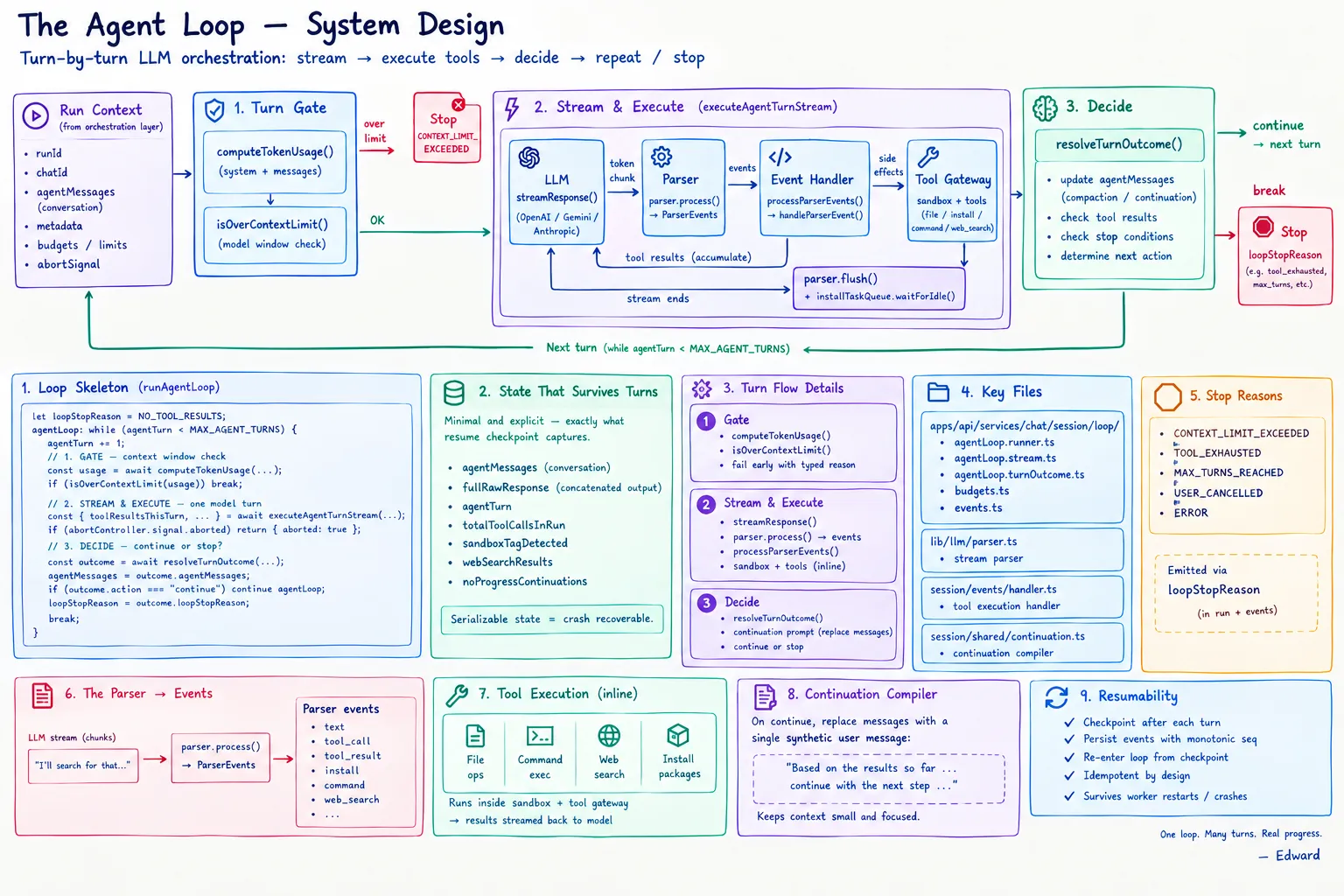
Then the agent loop begins.
The model is not expected to return a vague transcript. It speaks a small protocol. The parser recognizes normal text, thinking blocks, file writes, dependency installs, sandbox boundaries, command calls, web searches, URL scrapes, and done markers.
Some examples of the tags the stream parser understands:
<Thinking>...</Thinking><edward_sandbox>...</edward_sandbox><file path="src/App.tsx">...</file><edward_install>...</edward_install><edward_command command="pnpm" args='["run","build"]'><edward_web_search query="..." max_results="3"><edward_done />
Those tags become structured StreamEvent objects. The frontend receives text, thinking_start, thinking_content, file_start, file_content, file_end, install_content, command, web_search, url_scrape, metrics, preview_url, build_status, and meta events. The UI does not scrape markdown to guess what happened. It renders known event types.
Tool execution is also guarded. Commands and web searches pass through a tool gateway. The gateway builds an idempotency key from the run id, turn, tool name, and input. Successful tool outputs are stored in run_tool_call. If the worker retries the same turn, Edward can reuse the previous result instead of running the same side effect twice.
The loop has explicit stop reasons:
- done
- no tool results
- max turns reached
- per-turn tool budget exceeded
- per-run tool budget exceeded
- context limit exceeded
- tool payload budget exceeded
- continuation budget exceeded
- response size exceeded
Defaults are conservative: 12 turns, 12 tool calls per turn, and 24 tool calls per run unless configured otherwise. The user should not see a generic "something went wrong" when the real answer is "the run hit its tool budget."
If a turn produces tool results but not final code, Edward builds a continuation prompt with the tool outputs and gives the model another turn. If a turn produces no actionable output, it gets one no-progress nudge. If the model writes files, Edward treats that as code output and moves toward validation and build. That validation is deterministic, not another model call: automatic fixes for known post-generation issues run first, then a static pass checks the generated files for build-breaking problems. Error-level violations block the build and are stored as a failed build with a structured report.
The Sandbox Is The Runtime Boundary
Generated code needs a filesystem and a process. Edward gives each chat a Docker-backed sandbox rather than letting generated code run on the host.
Sandbox provisioning is per chat. Edward first checks Redis for an active sandbox. If the Redis state points at a live container, it refreshes the TTL and reuses it. If the Redis state is stale, it marks the lifecycle as failed and cleans it up. If Redis lost the state but Docker still has a running container with Edward labels for that chat, Edward rehydrates Redis from the Docker labels.
When no sandbox exists, provisioning takes a per-chat distributed lock in Redis. That prevents two concurrent requests from creating two containers for the same chat. Losers poll on a short interval and then usually discover the winner's sandbox.
The container is created with hard limits: 1 GB memory, 3 GB swap, half a CPU, a PID limit, and the non-root node user. After it starts, Edward disconnects it from Docker networks and verifies that no network connections remain. If isolation fails, the container is destroyed and provisioning fails.
There is one nuance worth being precise about: the normal sandbox runtime is isolated, but the build worker can deliberately reconnect the container during dependency installation and build, then disconnect it again. That is different from giving generated code a permanently networked environment. Runtime isolation is the default; controlled build access is a worker phase.
File writes are buffered in Redis first. When the model starts a file, Edward prepares the path in the container. File content streams into Redis buffers, and scheduled flushes append the data into the container. A final flush runs before build. Protected scaffold files are blocked for framework templates, paths are normalized, and files are sanitized after write so accidental fences or escaped HTML do not become part of the source.
Commands are restricted too. The allowed command list is small: ls, find, grep, mv, cp, mkdir, rm, cat, package manager commands, git, pwd, date, echo, touch, head, tail, wc, and tsc. Arguments are checked for count, length, control characters, unsafe paths, and known dangerous patterns. Output is capped and normalized before it goes back into the model loop.
The lifecycle itself is a Redis state machine:
provisioningactivecleaning_upterminatedfailed
A Lua script guards transitions, so the system cannot casually jump from any state to any other state. Cleanup flushes pending writes, attempts a backup, removes the container, clears Redis state, clears buffers, and marks the lifecycle terminated.
Builds Become URLs
Once the agent has produced code, the build path turns the sandbox into something the user can open.
The build worker claims the build record first. If the build is already terminal, it republishes the existing status and exits. If another worker has already claimed it, it leaves it alone. That makes repeated queue delivery boring instead of dangerous.
The builder then reconnects the container for the build phase, ensures pnpm exists, installs dependencies when node_modules is missing, merges requested packages into the project, and runs the unified build.
Before compiling, Edward injects preview-safe config:
- Next.js gets
output: "export", base path, asset prefix, trailing slash, unoptimized images, and build-time TypeScript/ESLint ignores for preview generation. - Vite gets a base path and a predictable build output.
- The builder checks toolchain compatibility, including Node version requirements for the framework and Vite versions.
Then it runs pnpm run build with telemetry disabled and a long timeout. If the build fails, Edward captures the tail of stdout/stderr and stores a structured error report on the failed build. If the build succeeds, output detection looks for the right directory: out, dist, .next, .output, or framework-specific locations.
The upload path streams the build directory out of Docker as a tar archive. Files go to S3 under the chat's preview prefix. HTML files get a preview runtime script injected so path-based previews and client-side navigation behave correctly. For SPA-style builds, Edward also uploads a fallback page. Stale preview files are cleaned up, the CDN can be invalidated, and the preview URL is resolved.
Deployment supports two routing modes:
- path previews, usually through a CloudFront URL shaped like
/userId/chatId/ - subdomain previews, registered through Cloudflare KV when custom preview routing is configured
The frontend receives build status events as the worker moves from queued to building to success or failed. A successful build produces the preview URL the user sees in the iframe.
The Database Is The Memory
Edward's database is not just account storage. It is the durable record of execution.
A chat owns messages, runs, builds, its generated title and SEO metadata, GitHub binding information, and optional preview subdomain state. A message stores role, content, timing, and token counts. A build stores status, preview URL, duration, and the structured error report when the build fails.
The run table is the execution control plane. It stores:
- lifecycle status:
queued,running,completed,failed,cancelled - current state:
INIT,LLM_STREAM,TOOL_EXEC,APPLY,NEXT_TURN,COMPLETE,FAILED,CANCELLED - current turn
- next event sequence
- loop stop reason
- termination reason
- error message
- metadata and resume checkpoint
- started and completed timestamps
run_event is append-only. Each event gets a sequence number unique within the run. That sequence is what makes replay work. A client can reconnect with a last event id, replay missed events from Postgres, then switch back to live Redis pub/sub.
run_tool_call is the idempotency table. A tool call has a name, input, output, status, duration, error message, and idempotency key. Retries become repeatable because tool side effects are recorded as data.
This is the difference between a chat transcript and an execution log. A transcript tells you what the assistant said. Edward's run tables tell you what the system did.
Why The UI Can Tell The Truth
The frontend is able to show a real-time build because the backend speaks in events with versions.
The event protocol includes text, thinking, file boundaries, installs, commands, searches, URL scrapes, metrics, rate-limit snapshots, preview URLs, build status, and session metadata. Each event has a type and a stream version. The UI can render file creation separately from terminal output, terminal output separately from assistant prose, and build progress separately from the model's response.
That also gives the system clean reconnection semantics. If the browser disconnects, the worker keeps going. Events continue to land in Postgres. When the browser comes back, it asks for events after its last seen sequence. Edward replays the gap and keeps streaming live events. The UI does not need to pretend the request never dropped.
Cancellation works the same way. The user cancels a run, the API marks the durable run state and publishes a Redis cancel signal. The worker's abort controller stops the stream session. The run finalizes as cancelled instead of leaving a half-open request somewhere in memory.
The Point Of The Architecture
The core idea behind Edward is that an AI coding product should be engineered like a runtime, not a prompt demo.
The LLM is important, but it is not the system. The system is the admission gate that refuses invalid work early. It is the run record that survives a process restart. It is the event log that can replay a session. It is the sandbox that keeps generated code inside a boundary. It is the build worker that turns files into a URL. It is the schema that lets you ask what happened after the fact.
Most failures in products like this are not model failures. They are handoff failures:
- the request dies but the job should continue
- the worker retries and repeats a side effect
- the browser reconnects and loses the build state
- two messages mutate one project at the same time
- a container disappears but Redis still thinks it exists
- a build succeeds but the preview routes assets incorrectly
- a model/key mismatch becomes a mystery SDK error
Edward is built around those handoffs. Every major step has a state, and every state has a place to live.
That is what happens between a sentence in the chat box and a running app on a preview URL. Not magic. A chain of deliberately boring, recoverable transitions.