Networking Deep Dive: Part 2
There's a gap between knowing what DNS is and having to debug why your domain stopped resolving on a Friday night. This post is about the second thing.
One IP, many services: ports make it possible
Your machine gets one IP. It's probably running a web server, a database, maybe SSH. Without ports, every packet would hit your network stack and your OS would have no idea which process should handle it. Ports are how it decides.
The IP gets you to the machine. The port gets you to the right process on that machine.
443  → HTTPS
80   → HTTP
5432 → Postgres
22   → SSH
See what's actually listening:
$ lsof -i -P | grep LISTEN
node      4123  shubho   24u  IPv4 0x...  TCP *:3000 (LISTEN)
postgres  2891  shubho    5u  IPv4 0x...  TCP *:5432 (LISTEN)
One IP, three servers. The OS keeps them from fighting over incoming data by checking the destination port and routing to the right process. The port is the multiplexer sitting inside the protocol.
The most common mistake people make here is thinking they need a separate IP for every service. You don't. Ports exist so you don't have to.
DNS is a distributed lookup chain, not a single server
You type shubhojeet.com into a browser. Your machine needs an IP before it can connect. So it asks DNS.
But nobody designed DNS as one server answering every request on the internet. That would collapse immediately. Instead, the lookup walks a chain:
ICANN → Registry (.com) → Registrar → Recursive resolver → Root → TLD → Authoritative
Each hop hands the query to the next server in the chain. You can watch every single step with one command:
$ dig shubhojeet.com +trace

shubhojeet.com.    300  IN  A  76.76.21.21
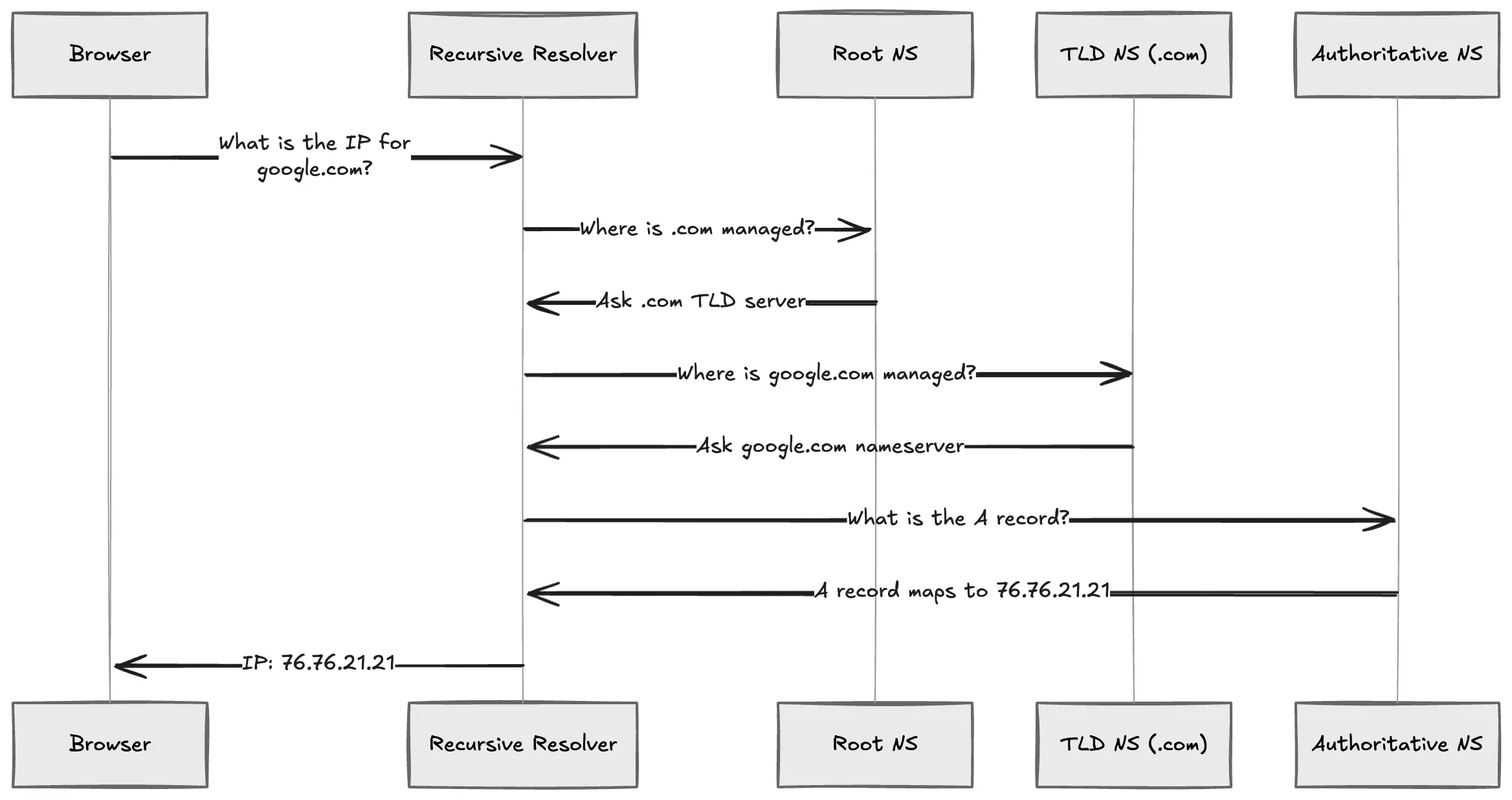
The line you see at the end is the authoritative nameserver. That is the server that actually owns the DNS records for that domain. Everything before it is routing.
Record types you'll actually configure
| Type | What it does | Example |
|---|---|---|
| A | Domain → IPv4 | shubhojeet.com → 76.76.21.21 |
| AAAA | Domain → IPv6 | shubhojeet.com → 2600:... |
| CNAME | Alias one name to another | www → @ |
| MX | Route email to a mail server | Points to mail.shubhojeet.com |
| TXT | Arbitrary text | SPF, DKIM, domain verification |
One thing that tripped me up every time I started with DNS: a CNAME cannot coexist with any other record at the same name. The spec just doesn't allow it. If you put an A record and a CNAME on www, most DNS providers will reject the configuration outright. And a domain can have both an A and an AAAA record, but you only get one IP address per type. That feels restrictive until you realize DNS is designed for redundancy at the server level, not at the record level.
TCP vs UDP: they solve the same problem with opposite trade-offs
I spent years treating TCP and UDP as exam questions. Then I shipped something that needed real-time data, and the choice stopped being theoretical.
TCP
TCP does a three-way handshake before any data moves: SYN → SYN-ACK → ACK. You pay that overhead once per connection, and in exchange you get a protocol that guarantees delivery, ordering, flow control, and congestion control.
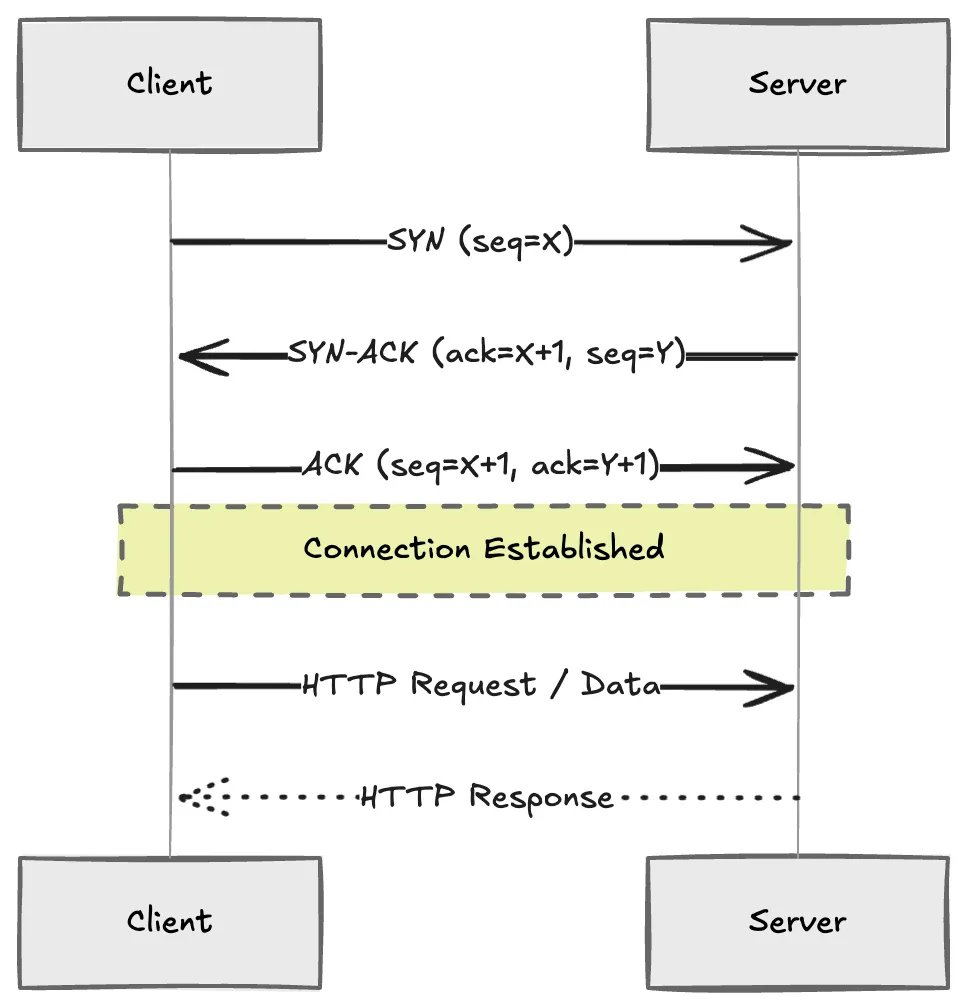
HTTP, SSH, WebSocket, SMTP — all TCP. If a packet drops, TCP resends it. If the network is congested, TCP slows down. These guarantees are not free: every retransmit adds latency on top of whatever the network is already doing wrong, and TCP's congestion control can sometimes make things worse before they get better.
UDP
UDP does not handshake. It does not resend. It does not check if the data arrived. It fires packets and forgets about them.
That sounds reckless, but it's exactly what you want when keeping up matters more than catching up. Video calls, live streams, online games, DNS lookups — all UDP. If a frame drops midway through a Zoom call, do you want to wait for a retransmit and freeze the video, or do you want the next frame? You want the next frame.
The decision rule has never failed me: if losing 1% of your payload breaks the feature, use TCP. If your feature breaks when it falls behind real time, use UDP.
Flow control vs congestion control: one protects the receiver, the other protects the network
These sound like the same concept. They are not, and mixing them up will make debugging network issues a nightmare.
Flow control protects the receiver. The sender paces itself based on how fast the receiver can process incoming data. The receiver advertises a window size, and the sender keeps itself within that window. If the receiver gets overwhelmed, it shrinks the window. The sender backs off. Simple.
Congestion control protects the network. If routers along the path are getting backed up, TCP reduces its sending rate. Different algorithms do this differently — Cubic looks for packet drops, BBR watches for increasing round-trip delay — but they all do the same thing: detect that the network is struggling and back off.
You do not configure these directly. TCP handles both. But understanding the difference matters when you see throughput drop and need to figure out whether the receiver is slow or the network is full.
Proxies hide something. The question is what.
Forward proxy
Sits in front of the client. Your request goes to the proxy, the proxy forwards it to the destination, and the destination sees the proxy's IP instead of yours.
$ curl -x http://proxy.example.com:8080 https://api.example.com
Use a forward proxy when you want to hide the client's identity, bypass a geographic restriction, or filter content inside a corporate network. One client, one proxy, one destination that never learns who actually made the request.
Reverse proxy
Sits in front of servers. Clients never talk to the origin. The proxy decides which backend handles each request.
# Caddy reverse proxy config
api.shubhojeet.com {
    reverse_proxy localhost:3000
}
Reverse proxies handle load balancing, rate limiting, caching, SSL termination — all of it without the backend knowing anything changed. The first time you set one up and realize your backend doesn't need to know about TLS or traffic distribution, it clicks.
Is a forward proxy a VPN?
No. This is a common confusion. A forward proxy works at the application layer and forwards traffic for one specific application. A VPN creates an encrypted tunnel at the device level and protects all traffic from the machine. A proxy is middleware. A VPN is a full encrypted pipe.
Load balancers are reverse proxies with health checks
A load balancer stands in front of a group of servers and decides which one gets the next request.
| Strategy | How it works | When to use |
|---|---|---|
| Round robin | Requests cycle through servers in order | Servers are roughly equal |
| Least connections | Server with fewest active connections gets the next request | Request durations vary a lot |
| Weighted | Servers get traffic proportional to their weight | Hardware is uneven |
| IP hash | Same client always hits the same server | Stateful apps (build stateless if you can) |
Pick one, measure it, and change only if the data tells you to. Overthinking load balancing strategies is a common trap. Most of the time round robin with health checks is fine.
Health checks are the invisible feature you don't appreciate until a server goes down and traffic keeps flowing. The load balancer pings each backend periodically. If a backend stops responding, it gets removed from the pool. When it comes back, traffic resumes automatically. No manual intervention.
CDNs make geography irrelevant for static content
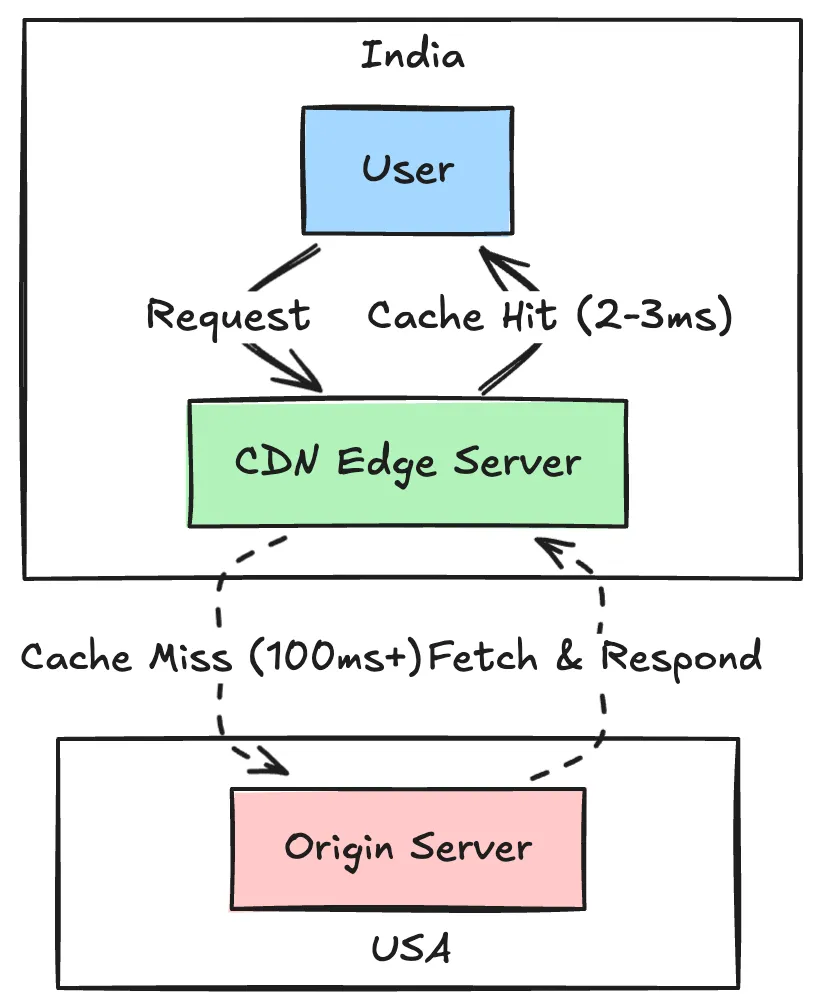
A CDN stores copies of your static files on edge servers physically close to your users. Without one, a request from Mumbai hits an origin in the US and crosses continents. With one, that file comes from Mumbai or Hyderabad and loads in 2-3ms.
You can check whether your CDN is actually doing its job from your terminal:
$ curl -I https://shubhojeet.com/assets/style.css
HTTP/2 200
age: 84321
x-cache: HIT
The age header tells you how many seconds the file has been sitting in the edge cache. x-cache: HIT means the CDN served it from the edge without hitting your origin.
These headers are debugging tools. Run them against your own site:
- If you see
MISSon every request, your cache configuration is broken - If
ageresets to a low number on every request, your cache is getting purged too aggressively - If you see
HITwith a highage, your CDN is working exactly as intended
None of this is complicated. It's just hard to learn from a textbook because the textbook tells you what things are but not when they break. The commands above — dig +trace, lsof -i -P, curl -I, curl -x — are the ones I reach for most when something isn't working. Add them to your mental toolbox.
Next post covers cryptography basics and subnets, then WebSockets and gRPC.