Subnets, NAT, firewalls, WebSockets, gRPC, GraphQL. These are the things you actually configure and debug once you get past the fundamentals. This post covers what they do and the trade-offs nobody mentions until you've already made the wrong choice.
Subnetting: why your network isn't one big flat mess
A subnet is a smaller network carved out of a larger one. The name is literal: sub-network.
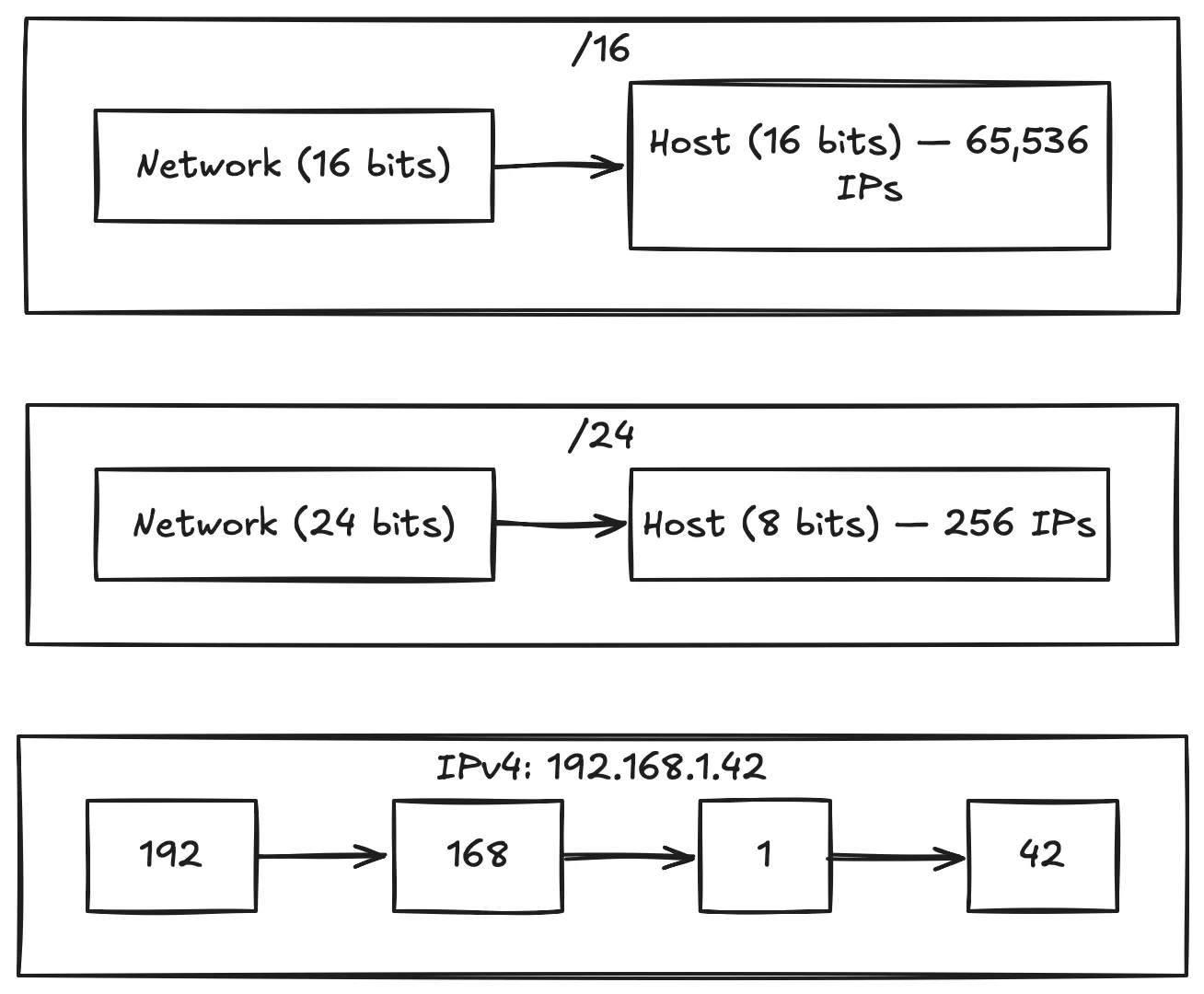
The notation looks like 10.0.0.0/16. That /16 is CIDR notation — it tells you how many of the 32 bits in an IPv4 address are reserved for the network. The rest are for individual hosts.
An IPv4 address is 32 bits, split into four octets:
  192 . 168 .  1  .  42
  11000000 10101000 00000001 00101010
  ^^^^^^^^ ^^^^^^^^ ^^^^^^^^ ^^^^^^^^
   octet 1  octet 2  octet 3  octet 4
When you see /24, it means the first 24 bits identify the network. That leaves 8 bits for hosts — 256 addresses. /16 leaves 16 bits for hosts — 65,536 addresses.
Two reasons subnets exist:
- Group related machines. Put all the database servers in one subnet, web servers in another. Traffic between groups routes through a gateway you can monitor and firewall.
- Contain broadcast traffic. Broadcasts stay inside the subnet. Without subnets, an ARP broadcast would hit every machine on the network.
Think of it like zip codes. Your address is unique, but the zip code tells the postal service which sorting facility to use. Subnets tell routers which direction to send packets without needing to know every individual host by name.
NAT: how 200 devices share one public IP
Network Address Translation is why your phone and laptop show the same IP when you visit "what's my IP" websites. Every device on your Wi-Fi gets a private IP — typically 192.168.x.x, 10.x.x.x, or 172.16.x.x — and NAT translates those private addresses to the single public IP your ISP gave you.
NAT exists because there are more devices on the internet than IPv4 addresses. It stretches the address space by letting an entire household share one public IP.
Here's how it works:
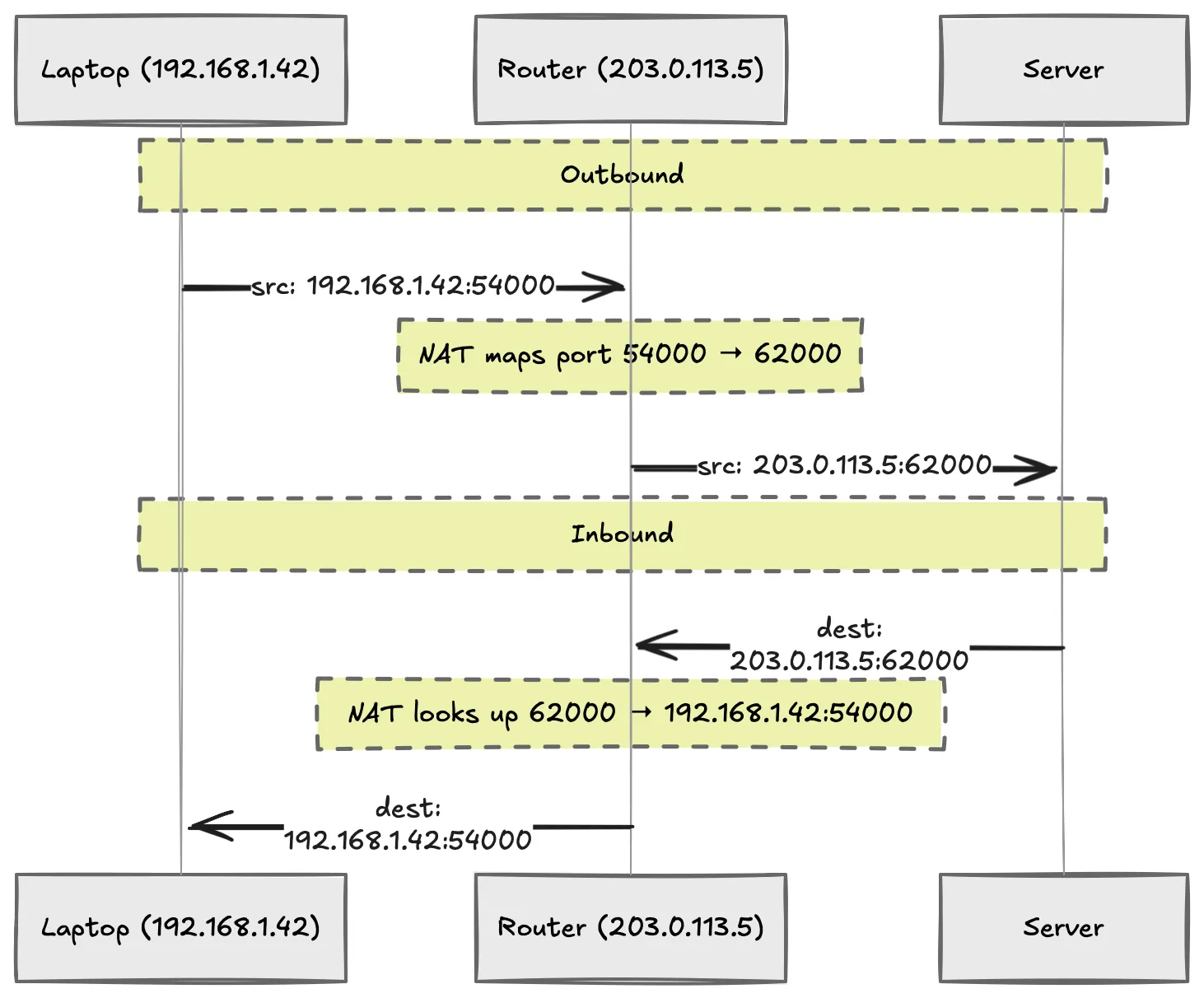
- Your laptop at
192.168.1.42sends a request to a server. - The router rewrites the source IP to its public address and assigns a unique port.
- The response comes back to the router on that port.
- NAT looks up the mapping and forwards the response to your laptop.
NAT adds a security layer by accident: private IPs are unreachable from the outside internet. Someone on the public internet cannot connect directly to 192.168.1.42 because that IP only exists inside your network. The outside world sees your router, not your laptop.
Firewalls: traffic control with teeth
A firewall sits between your network and the internet. It checks each inbound request against rules and rejects anything that doesn't match. It is not a reverse proxy — it does not distribute traffic or terminate SSL.
Three rules worth memorizing:
- Allow only required traffic. Running a web server? Block everything except ports 80 and 443.
- Expose only needed services. Do not leave SSH (port 22) open to the whole internet unless you have a very good reason.
- Restrict admin access to specific IPs. If three people need to manage the server, write rules that only allow their addresses.
A properly configured firewall stops most automated attacks before they reach your application. It's the most effective protection you can set up, and the most commonly neglected.
WebSockets: when HTTP's request-response model is not enough
HTTP has a hard limitation: the server cannot send data unless the client asks for it. That works for loading a page, but breaks for anything real-time — chat apps, live notifications, multiplayer games, collaborative editing.
WebSockets fix this by upgrading an HTTP connection into a persistent, full-duplex TCP connection.
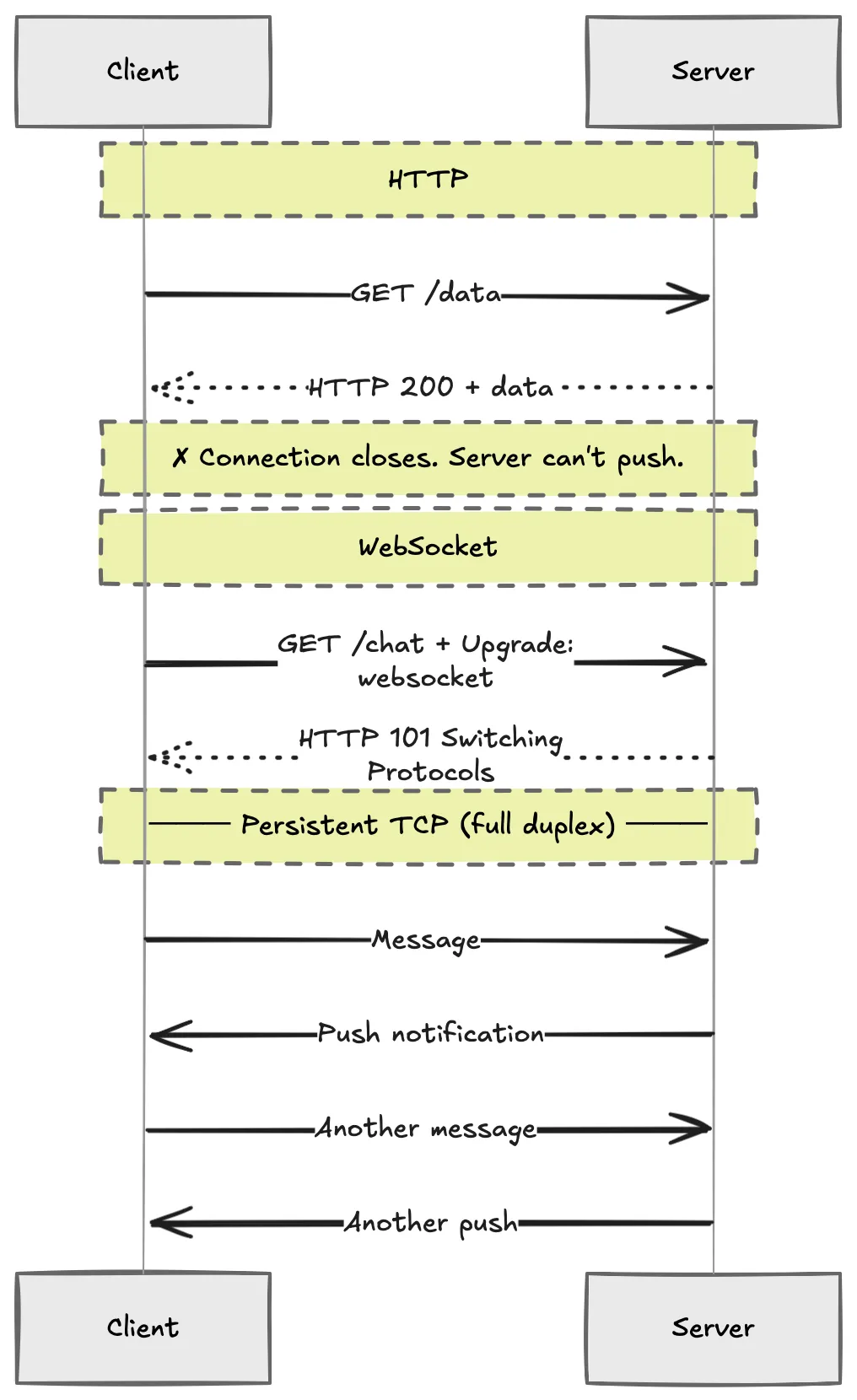
The handshake is one HTTP request with an upgrade header:
GET /chat HTTP/1.1
Host: server.example.com
Upgrade: websocket
Connection: Upgrade
If the server accepts, the protocol switches from HTTP to WebSocket on the same TCP connection. Both sides can push data at any time. It's TCP underneath, so you get reliable, ordered delivery.
The catch: WebSockets are stateful. HTTP requests are stateless — you can put a load balancer in front of a hundred identical servers and every request routes wherever there's capacity. A WebSocket holds a persistent connection to a specific server instance. Scaling it requires sticky sessions, a pub/sub layer like Redis, or a dedicated WebSocket proxy. All of those add complexity.
Use WebSockets when you genuinely need real-time two-way communication. Do not use them when HTTP polling or server-sent events would work, because you will pay for that stateful complexity later.
gRPC: calling remote code like it's local
gRPC is a Remote Procedure Call framework. Your client calls server-side methods as if they were local functions. No URL routing, no parsing JSON responses, no guessing the shape of the response.
It is built on Protocol Buffers — a binary serialization format with a strictly typed schema. You define your service and messages in a .proto file, and gRPC generates client and server code for you.
service UserService {
  rpc GetUser (UserRequest) returns (UserResponse);
}

message UserRequest {
  string user_id = 1;
}

message UserResponse {
  string name = 1;
  string email = 2;
}
The client imports the generated code and calls GetUser like a local function. Under the hood, gRPC serializes the request with protobuf, sends it over HTTP/2, and deserializes the response. You never touch the wire format.
What gRPC is good for: fast service-to-service communication. The binary format and HTTP/2 multiplexing make it significantly faster than JSON over HTTP/1.1. The contract means both sides agree on the schema at compile time. No runtime surprises.
What gRPC is bad at: browser clients and human readability. You cannot inspect gRPC traffic with curl without extra tooling. The generated code is verbose. gRPC shines between microservices. It is awkward between a browser and a server.
GraphQL: the client asks for exactly what it needs
GraphQL flips the REST model. Instead of the server defining fixed response shapes per endpoint, the client sends a query describing which fields it needs. The server returns only those fields.
query {
  user(id: "42") {
    name
    email
  }
}
Response:
{
  "data": {
    "user": {
      "name": "Shubhojeet",
      "email": "shubho@example.com"
    }
  }
}
Key differences from REST:
- Single endpoint. Instead of
/users,/users/42,/users/42/posts, GraphQL typically exposes one endpoint. The query determines the response. - Typed schema. The server defines a schema with types. Both sides agree on the contract.
- Nested queries. Need the user's name and their latest five posts in one trip? Ask for both in one query. No waterfall.
GraphQL shines when clients have varying data needs — a mobile app fetches fewer fields than a desktop dashboard. The trade-off: the server now handles query parsing and field resolution. Complexity moves from the client to the backend. N+1 query problems are common if resolvers are not batched properly.
Which one do you actually reach for?
- REST. Default choice for CRUD apps, public APIs, maximum client compatibility.
- WebSockets. Real-time bidirectional communication when you can accept stateful connections.
- gRPC. Internal microservice traffic where performance matters more than debuggability.
- GraphQL. Multiple clients with different data needs and you want to avoid maintaining separate endpoints for each.
Most services do not need gRPC or GraphQL. Start with REST. Add the others only when the limitations of REST are costing you something measurable.